Features for partners, associates and clients
One Brief has a view for partners, one for associates and one for clients, all working from the same matters.
The screens below come from our demo firm. Every person, firm and case in them is invented.
One Brief has a view for partners, one for associates and one for clients, all working from the same matters.
The screens below come from our demo firm. Every person, firm and case in them is invented.
Everything across the firm: every matter, the team's work, today's hearings and what is ready to bill.
Start each day with a snapshot: today's cases, scheduled meetings, and priority tasks, all on one screen. Your morning briefing, ready automatically.
See it live →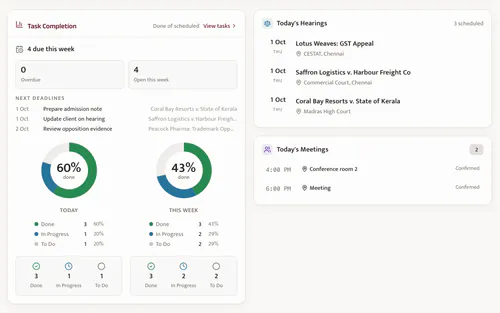
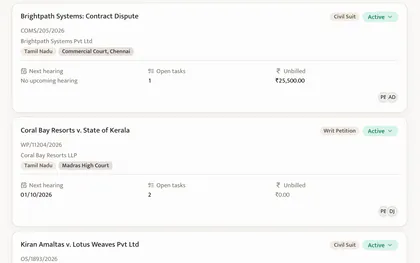
Every case in one place: hearing history, documents, client details, assigned associates, and billing status, all searchable and organized.
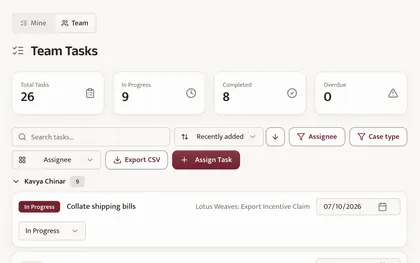
Delegate to associates with clear deadlines. Track progress, review completions, redistribute workload as needed.
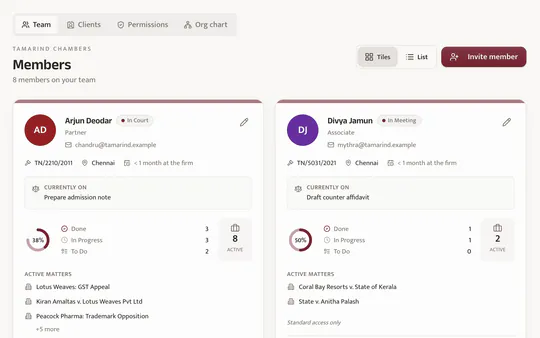
See each associate's matters and tasks, what is done and what is still open. See who's in court, who's in office and who's on leave today.
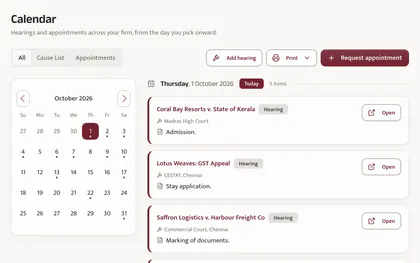
Hearings and appointments across your firm on one month view. Switch to just the cause list or just appointments.
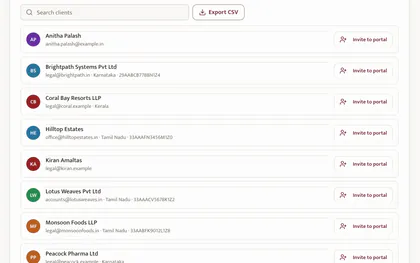
Client profiles with contact details, their cases, and a running account of invoices and payments.
One matter can hold several proceedings, such as the original case and its appeal, each with its own court, case type and CNR. Link related matters so each one opens from the other.
When the court record shows a case has been disposed, One Brief suggests a last date to appeal or seek review, based on the case type. It is marked as advisory: a prompt to check and diarise the real deadline.
Time logged after a hearing waits as unbilled work on the matter. Raise a GST invoice from it, and each invoice shows where it is: drafted, approved, sent or paid.
Track billable hours by associate and case, outstanding balances and payments received, and run financial reports.
Animation, eight seconds. After a hearing, Kavya Chinar logs 1.5 hours on Lotus Weaves. A GST invoice for 7,080 rupees is drafted from that time, and its progress rail moves from drafted, to approved by Meera Amaltas, to sent with payment due 15 October, to paid on 9 October: Paid in full.
Decide who must approve an invoice, an expense or a billing worksheet before it goes ahead: a role or a named person, for the whole firm or for one client, and above an amount you set.
Record expenses against a matter and the firm's own running costs. See what each client owes and how long it has been outstanding.
For your accountant, download CSV registers for any period: invoices with the GST split, receipts with TDS, and, for GST-registered firms, credit notes.
Case-specific messaging keeps conversations organized and confidential. Review associate-client exchanges when needed.
Print today's hearings, or the next 7, 14 or 30 days, on your firm's letterhead: grouped by date and court, with the case number and the advocates on each matter. It saves as a PDF.
| Case (per court) | Case no. | Advocate(s) |
|---|---|---|
| Madras High Court | ||
| Coral Bay Resorts v. State of Kerala | WP 18214/2026 | Kavya Chinar |
| Lotus Weaves v. Asst. Commissioner (GST) | WA 2210/2026 | Arjun Deodar |
| Commercial Court, Chennai | ||
| Saffron Logistics v. Harbour Freight Co | COMS 118/2026 | Priya Banyan |
Animation, five seconds. From the Print menu, Next 7 days is chosen, and a cause list prints on the firm's letterhead, each day's hearings grouped by court with the case number and advocate.
Link a case by its CNR, or find it on eCourts by party, advocate or case number. Twice a day, at 7 AM and 7 PM, One Brief asks eCourts for a fresh copy of the cases that are due, timed around their hearings. Status, hearing dates and orders follow the court record, for High Courts and district courts alike.
The matters an associate is on, their tasks and deadlines, their calendar and the case chat.
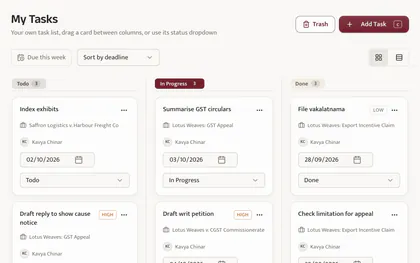
View all assigned tasks with deadlines and priority levels. Mark tasks complete and track your own progress.
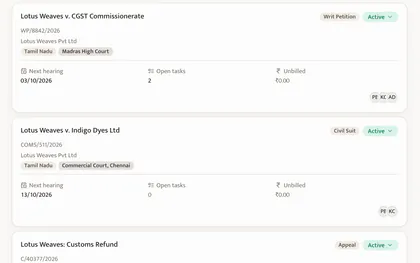
Access details for every case you're involved in: hearing history, documents, client information, and billing status.
Heading to court? Set your status to In Court, and partners and colleagues see it on the team's availability page. Mark yourself available, in a meeting, on leave or out of office the same way.
| Name | Status |
|---|---|
| Kavya Chinar | In Court |
| Meera Amaltas | Available |
| Vikram Sheesham | On Leave |
| Arjun Deodar | In Court |
Animation, four seconds. Kavya Chinar, an associate, picks In Court on her Availability page and saves. Her row on the team's availability table changes from Available to In Court.
Your schedule: hearings, meetings, deadlines, and reminders, filtered to show only what's relevant to you.
Your profile reflects your position (Junior Associate, Senior Associate, or other designation) so responsibilities and permissions are clear.
View and manage scheduled appointments with clients and/or partners. All in one place.
Case-specific chat with team members. Keep discussions organized by matter.
Clients see their own matters: the next date, the documents you share, messages with the team and what is due.
Available on request: we switch it on when your firm is ready to invite clients.
View all matters you've engaged the firm for. Track hearing dates, case status, and key updates in one place.
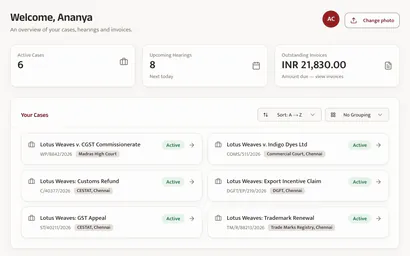
Clients see their invoices, which ones are paid, and what is still due, with a PDF of each.
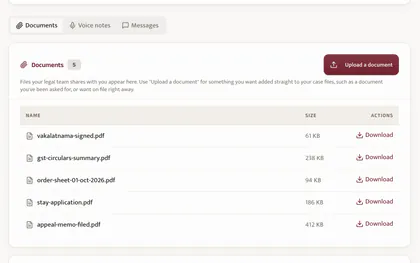
Access case-related documents shared by your legal team. Download or review at any time, from any device.
Message your assigned associates or partners securely. Conversations organized by case for easy reference.
See upcoming meetings with your legal team. Request new appointments directly through the portal.
How people sign in, what each role can do, a record of who changed what, and the ways to reach your firm's work away from the desk.
Confirm each sign-in with an authenticator app, with recovery codes, or with a code sent by email. Two-factor can be required for everyone in your firm.
People can also sign in with their Google account or Microsoft work account, as long as they are already on your firm's team.
A record of who did what: changes to matters, hearings, tasks, documents, invoices and permissions, with a short note of what changed. Filter by person, type or date, and export it as CSV.
Choose what each role in your firm can do: see billing, set rates, manage matters, see every matter, or manage the team. Partners always have full access.
Add One Brief to your phone's home screen from the browser and it opens like an app. There is nothing to download from an app store. It needs an internet connection to show your firm's data.
Connect an AI assistant such as Claude or ChatGPT to One Brief, then ask about your matters, hearings, tasks and invoices in plain language. The assistant signs in as you and sees only what you can see.
Changes that matter, such as anything involving money, court dates, permanent deletions or what a client sees, are shown to you first and only go through when you confirm them. Your firm chooses who can use the assistant and whether it can only read or also make changes.